Most data cleaning tools promise the same thing: upload your file, click a button, get clean data. The reality? You end up running four separate tools in sequence, manually reconciling the results, and still finding duplicates in your CRM six months later.
This guide cuts through the marketing noise. Whether you're evaluating tools for the first time or replacing something that isn't working, here's what actually matters when choosing data cleaning software in 2026.
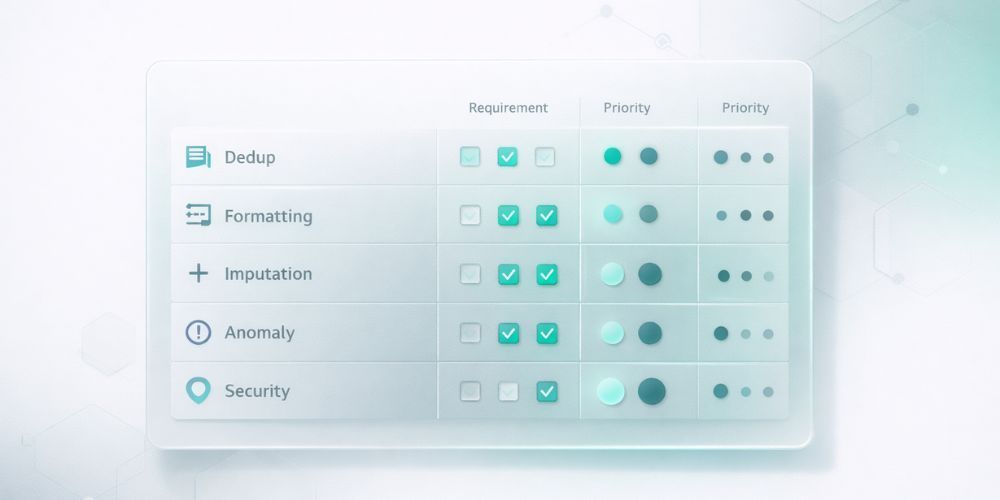
1. Duplicate Detection (The Make-or-Break Feature)
This is where most tools fail quietly. Basic string matching catches "John Smith" appearing twice. But what about "Jon Smith" and "John Smyth" at the same company? Or "IBM" and "International Business Machines"?
The difference between adequate and excellent deduplication comes down to matching approach:
Exact matching compares strings character by character. Fast, but misses the duplicates that actually cause problems. Your database probably has hundreds of these hiding in plain sight.
Fuzzy matching uses algorithms like Levenshtein distance to find similar strings. Better, but still trips over common variations. "Robert" and "Bob" look nothing alike to these systems.
Semantic matching understands that names, company variations, and nicknames can represent the same entity. This is where AI-powered tools earn their keep. When evaluating, ask: "Will this catch 'Bob Roberts' and 'Robert Roberts Jr.' at 'Acme Corp' and 'Acme Corporation' as potential matches?"
The tool should also let you configure matching sensitivity. Too aggressive, and you'll merge records that shouldn't be merged. Too conservative, and you're back to manual cleanup.
Questions to ask vendors:
- What matching algorithms do you use?
- Can I adjust sensitivity thresholds?
- How do you handle company name variations?
- What's your false positive rate?
2. Format Standardization
Your data comes from everywhere: manual entry, form submissions, imports from other systems, API syncs. The formatting chaos that results isn't anyone's fault. It's just reality.
Good standardization handles:
Phone numbers should convert to a consistent format. International support matters more than you think, especially if you have customers or contacts outside the US. Look for E.164 format support.
Email addresses need more than lowercase conversion. Typo detection ("gmial.com" anyone?) and RFC compliance checking separate the useful tools from the basic ones.
Names and titles require nuance. Professional credentials (MD, PhD, CPA, JD) should be preserved and formatted correctly. "dr john smith phd" becoming "Dr. John Smith, PhD" is the goal.
Addresses are deceptively complex. "Street" vs "St." vs "ST" is the easy part. Handling apartment numbers, suite designations, and international formats is where tools differentiate.
Questions to ask vendors:
- How many phone number formats do you support?
- Do you detect common email typos?
- How do you handle professional credentials?
- What address components can you standardize?
3. Missing Value Handling
Empty fields are everywhere. The question is what to do about them.
Basic tools just flag missing values. Better tools offer imputation, using patterns in your existing data to predict what's missing. If 95% of contacts with a "94102" zip code are in San Francisco, a tool can reasonably suggest "San Francisco" for records with that zip code but no city.
The key is confidence scoring. You want predictions that are almost certainly correct to be applied automatically, while uncertain predictions get flagged for review. Nobody wants an AI guessing wildly and corrupting their data.
Questions to ask vendors:
- What methods do you use for imputation?
- How do you calculate confidence scores?
- Can I set thresholds for automatic vs. manual review?
- What data relationships does the system learn from?
4. Anomaly Detection
Some values are technically valid but obviously wrong. An age of 247. A negative order total. A phone number with 15 digits. A date in 1847.
Anomaly detection catches these before they pollute your analytics or trigger embarrassing automation failures.
Look for:
Statistical outliers: Values that fall far outside normal ranges for that field.
Pattern violations: Phone numbers, emails, or other structured data that don't match expected formats.
Logical impossibilities: Dates in the future for birthdays, negative values where only positives make sense.
The best tools use multiple detection methods (Z-scores, IQR analysis, isolation forests) and let you configure sensitivity. What counts as an anomaly in your data might be normal in someone else's.
Questions to ask vendors:
- What detection algorithms do you use?
- Can I adjust sensitivity by field type?
- How are flagged anomalies presented for review?
- Can I teach the system what's normal for my data?
5. Security and Governance
Your data probably contains PII. Customer names, emails, phone numbers, addresses. Maybe payment information or health data. The tool you choose will have access to all of it.
Non-negotiable requirements:
Encryption: Data should be encrypted in transit (TLS) and at rest (AES-256 or equivalent).
Access controls: Role-based permissions, SSO support for enterprise deployments, and audit logs of who accessed what.
Compliance: Depending on your industry, you may need SOC 2 Type II certification, GDPR compliance documentation, or HIPAA BAA availability.
Data residency: Where is data processed and stored? This matters for GDPR and some industry regulations.
Audit trails: Every change to your data should be logged. What changed, why it changed, when it changed, and what the original value was. This isn't just nice to have for compliance. It's essential for trusting the output.
Questions to ask vendors:
- What certifications do you hold?
- Where is data processed and stored?
- Can you provide a SOC 2 Type II report?
- How long are audit logs retained?
The Integration Question
A tool that only handles CSV uploads creates a manual workflow: export from your CRM, upload to the cleaning tool, download the results, re-import to your CRM. This gets old fast.
Direct integrations with your existing systems (Salesforce, HubSpot, Mailchimp, Shopify, Klaviyo) eliminate that friction. You connect once, then sync data without the export/import dance.
But integration depth varies. Some tools only pull data out. Others can push cleaned data back. The best ones handle bidirectional sync with conflict resolution.
Questions to ask vendors:
- Which platforms do you integrate with natively?
- Is the integration read-only or bidirectional?
- How do you handle conflicts when pushing data back?
- What's the sync frequency?
RFP Checklist: What to Include
If you're running a formal evaluation, here's a starting point for your requirements document:
Core Capabilities
- Duplicate detection with semantic/AI matching
- Configurable matching thresholds
- Phone, email, name, address standardization
- International format support
- Missing value prediction with confidence scoring
- Statistical and pattern-based anomaly detection
- Complete audit trail of all changes
Security and Compliance
- SOC 2 Type II certification (or timeline to certification)
- Data encryption in transit and at rest
- Role-based access controls
- SSO support
- GDPR/CCPA compliance documentation
Integrations
- Native connectors to [list your critical systems]
- Bidirectional sync capability
- API access for custom integrations
Usability
- No-code interface for non-technical users
- Preview before applying changes
- Undo capability for all operations
- Real-time progress visibility during processing
Pricing
- Transparent pricing structure
- All features included (vs. modular pricing)
- Volume-based tiers that fit your data scale
Download the Data Cleaning Software Evaluation Questions to Ask Vendors guide.
What We Built CleanSmart For
Full disclosure: we make data cleaning software. CleanSmart exists because we got tired of the fragmented workflow that most tools create.
Our approach: one cleaning pass handles deduplication, formatting, gap-filling, and anomaly detection together. Semantic matching catches the duplicates that string comparison misses. Confidence scoring routes uncertain changes to humans for review. A complete audit trail logs every modification.
We're not the right fit for everyone. If you need deep Salesforce workflow automation or enterprise-scale data governance, there are tools built specifically for that. But if you're a marketing, RevOps, or sales ops team dealing with messy lists and want something that works without a data engineering degree, that's what we built.
How much does data cleaning software typically cost?
Pricing models vary widely. Some tools charge per record processed. Others use monthly subscriptions with record limits. Enterprise tools often require custom quotes. For SMB-focused tools, expect monthly plans ranging from $50 to $400 depending on volume and features. Watch out for modular pricing where each capability (deduplication, formatting, etc.) costs extra.
Can data cleaning software handle data from multiple sources?
Some tools focus on single-file cleaning (upload a CSV, get it cleaned). Others support multi-source merging, where you combine data from different systems into a unified dataset. If you're dealing with data scattered across Salesforce, Mailchimp, and spreadsheets, look for tools with hub-and-spoke architecture and conflict resolution capabilities.
How long does data cleaning take?
Processing time depends on dataset size and the complexity of operations. Most modern tools process 10,000 records in under two minutes. Larger datasets (100K+ records) may take longer, especially with AI-powered matching. Real-time progress indicators help you understand what's happening rather than staring at a spinner.