Most teams treat deduplication like a one-time project. They run a tool, merge the duplicates, and move on. Six months later, the database is full of duplicates again.
The problem isn't the tool. It's the strategy.
Deduplication isn't a single event. It's a three-phase process that happens before, during, and after the merge. Get any phase wrong, and you're back to square one.
Here's how to handle duplicates at every stage.

The Three Phases of Duplicate Management
Think of duplicate management like water damage. You can mop up the flood (detection and merging), but if you don't fix the leak (prevention) and check for mold later (maintenance), the problem keeps coming back.
Phase 1: Before (Prevention)
Phase 2: During (Detection and Merging)
Phase 3: After (Survivorship and Maintenance)
Most teams skip straight to Phase 2. They buy a deduplication tool, run it once, and wonder why duplicates keep appearing. The answer is usually that they never addressed Phase 1 or Phase 3.
Let's break down each phase.
Phase 1: Before the Merge (Prevention)
The cheapest duplicate to fix is the one that never gets created.
Prevention happens through input controls. Every form field, every import process, every manual entry point is an opportunity for duplicates to sneak in.
Here's what actually works:
Standardize at the point of entry. If someone types "Jon" and "John" into your system as separate contacts, no deduplication tool will know they meant the same person. Implement autocomplete against existing records. When someone starts typing "Jo...", show matching contacts so they can select instead of create.
Block obvious duplicates in real-time. Before a new record saves, check for exact email matches. This catches the 30% of duplicates that are pure carelessness. Yes, 30%. In our early testing, roughly a third of duplicates were exact matches that should never have been allowed in.
Standardize formats immediately. Phone numbers are a perfect example. "(555) 123-4567" and "555.123.4567" and "5551234567" are the same number, but your database treats them as three different records. Format them identically the moment they enter your system.
Train your team. This sounds obvious, but most duplicate problems are process problems, not data problems. The sales rep who creates a new contact instead of searching first is creating work for everyone downstream.
Prevention won't eliminate duplicates entirely. Data comes from too many sources: imports, integrations, web forms, manual entry. But it can reduce your duplicate rate by 40-60% before you ever need to run a detection tool.
Phase 2: During the Merge (Detection and Thresholds)
This is where most teams focus all their attention. It's also where the decisions get tricky.
Detection isn't binary. You're not looking for records that are definitely duplicates versus records that definitely aren't. You're working with probabilities.
The threshold decision. Set your matching sensitivity too high, and you'll miss duplicates that should be caught. "Robert Smith" and "Bob Smith" at the same company? Probably the same person, but a strict algorithm won't flag it. Set it too low, and you'll merge records that shouldn't be merged. "John Smith" at IBM and "John Smith" at Microsoft? Different people, but an aggressive algorithm might combine them.
There's no universal right answer here. The correct threshold depends on your data, your tolerance for false positives, and how much manual review you can handle.
A general framework:
- High-confidence matches (90%+ similarity): Auto-merge with logging. These are near-certain duplicates.
- Medium-confidence matches (70-89%): Flag for human review. Worth checking, but not certain enough to automate.
- Low-confidence matches (below 70%): Keep separate unless you have additional context.
Matching on multiple fields matters. Single-field matching (just email, just name, just phone) catches obvious duplicates but misses the subtle ones. The real wins come from composite matching: name AND company AND email domain together create much stronger signals than any field alone.
CleanSmart's SmartMatch™ uses semantic similarity for this exact reason. It understands that "Robert" and "Bob" might be the same person, that "IBM" and "International Business Machines" are the same company. Traditional string matching can't see these connections.
Phase 3: After the Merge (Survivorship and Conflicts)
You've found your duplicates. Now you need to decide: when two records merge, which data survives?
This is called survivorship, and it's where most teams don't have a strategy at all. They just let the tool pick, often getting worse data quality as a result.
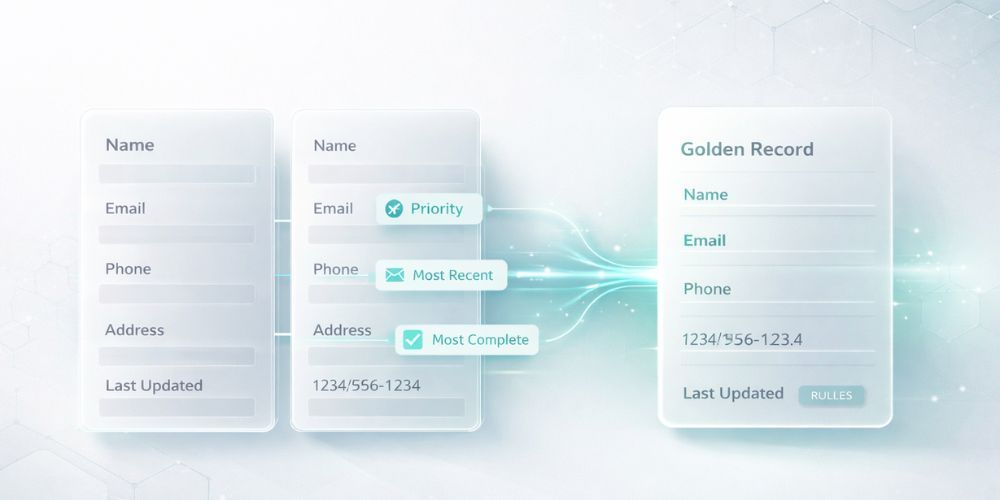
The golden record problem. When you merge "John Smith" with email john@gmail.com and "Jon Smith" with email jsmith@company.com, which email do you keep? The answer depends on context. For B2B sales, the company email is probably more valuable. For consumer marketing, the personal email might have better deliverability.
Survivorship rules should be explicit:
Most complete wins. If Record A has a phone number and Record B doesn't, keep Record A's phone number. Simple, but only works when one record is clearly more complete.
Most recent wins. For fields that change over time (job title, company, address), the newer value is usually more accurate. But this requires reliable timestamp data, which many systems don't have.
Source priority. Trust Salesforce data over spreadsheet imports. Trust CRM data over marketing automation. Define a hierarchy based on which systems have the most reliable data entry processes.
Field-by-field selection. The most accurate approach, but also the most labor-intensive. Review each field and pick the best value. This is often worth doing for high-value records like enterprise accounts.
Handling Conflicts: Which Record Wins?
Conflicts happen when both records have data for the same field, but the values disagree.
"John Smith" with title "Director of Marketing" merges with "John Smith" with title "VP of Marketing." Which is correct? Maybe he got promoted. Maybe one record is outdated. Maybe they're actually different people.
Conflict resolution strategies:
Manual review for important fields. Title, company, and decision-maker status are worth verifying. Email typos? Probably safe to automate.
Preserve history. Don't delete the losing value. Store it in a notes field or audit log. You might need it later.
Flag uncertain merges. If you can't determine which value is correct, mark the merged record for follow-up. A sales rep who knows the customer can often resolve conflicts that algorithms can't.
The Audit Trail Question
Here's something most teams don't think about until it's too late: can you prove what changed?
Regulatory requirements (GDPR, CCPA) and internal audits increasingly require documentation of data changes. When a customer asks "why do you have this information about me?" you need to answer.
Every merge should log what changed, when it changed, why it changed (which rule triggered the merge), the original values, and the new values.
CleanSmart maintains this audit trail automatically. Every SmartMatch™ merge, every AutoFormat correction, every SmartFill prediction is logged with confidence scores and reasoning. When compliance comes asking, you have answers.
Ongoing Maintenance vs. One-Time Cleanup
The final piece: deduplication is not a project with an end date.
Data entropy is real. New duplicates appear constantly through imports, integrations, manual entry, and legitimate reasons (someone changes jobs and needs a new record, but the old one doesn't get removed).
Build deduplication into your regular operations:
Weekly or monthly sweeps. Run detection on new records regularly, not just when someone complains about data quality.
Integration checkpoints. Every time data flows in from an external system, run it through deduplication before it hits your main database.
Quality metrics. Track your duplicate rate over time. If it's climbing, your prevention controls are failing. If it's flat, your maintenance is working.
The goal isn't zero duplicates. That's probably impossible unless you have perfect data sources and perfect entry processes. The goal is a sustainable duplicate rate that doesn't compound over time.
Putting It All Together
Deduplication strategy in three phases:
- Before: Prevent duplicates at entry points. Standardize formats. Block obvious matches. Train your team.
- During: Detect with appropriate thresholds. Match on multiple fields. Use semantic similarity for subtle matches.
- After: Define survivorship rules. Handle conflicts explicitly. Maintain audit trails. Schedule ongoing maintenance.
Most teams get stuck because they only do one of these phases. They run a cleanup tool once and declare victory, then watch duplicates creep back in.
The teams with clean data do all three, continuously.
CleanSmart's SmartMatch™ handles the detection and merging phase with semantic similarity that catches duplicates traditional tools miss. But the platform also supports the ongoing maintenance piece: you can run deduplication regularly as part of your data operations, not just as a one-time project.
The best deduplication tool is only as good as the strategy around it.
What's the difference between exact matching and semantic matching for deduplication?
Exact matching looks for identical strings. If "John Smith" appears twice with the same email, it's flagged. Semantic matching understands meaning: it recognizes that "Robert" and "Bob" might be the same person, or that "IBM" and "International Business Machines" refer to the same company. Exact matching catches obvious duplicates but misses the subtle ones that often cause the most problems.
How often should I run deduplication on my database?
It depends on how much new data enters your system. High-volume databases (daily imports, heavy web form traffic) benefit from weekly sweeps. Lower-volume systems might be fine with monthly reviews. The key is consistency: schedule it as a regular operation, not an emergency response to complaints about data quality.
Should I automatically merge duplicates or review them manually?
Both. High-confidence matches (90%+ similarity on composite fields) are usually safe to auto-merge with logging. Medium-confidence matches should be flagged for human review. The balance depends on your tolerance for false positives and how much review bandwidth you have. Starting more conservative (more manual review) and loosening thresholds as you build confidence is usually the safest approach.